
OAuth Consent Phishing: When the Login Page Is Legitimate
Most security awareness training still teaches people to spot a fake login page - a suspicious domain, an unexpected password prompt or a page that just doesn’t look quite right.
OAuth consent phishing, sometimes called an illicit consent grant attack, doesn’t necessarily need any of that.
The victim can authenticate with Google on the real Google domain, using their real account and normal authentication process. And instead of stealing their credentials, the attacker wants them to click Allow on an OAuth consent screen.
If the user grants the requested permissions, an attacker controlled application can receive access to resources such as their email, files or other Google Workspace data.
No fake Google login page is required here. And no password needs to be stolen. Also MFA doesn’t solve the problem if the user successfully authenticates and then deliberately authorises the malicious application.
That creates an awkward blind spot for security awareness programmes built primarily around teaching users to recognise credential phishing.
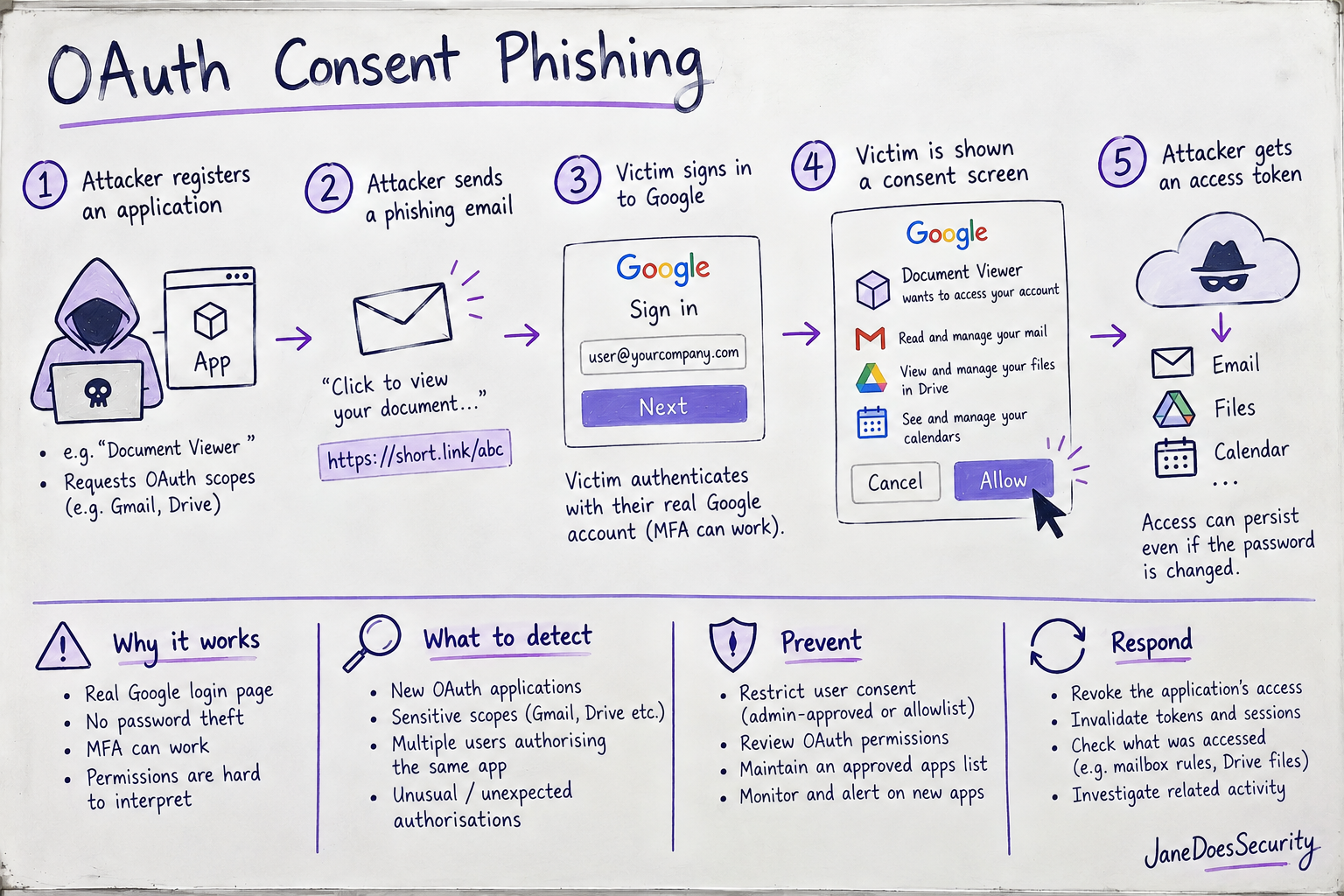
How does the attack work
OAuth is designed to let third-party applications access resources on a user’s behalf without giving those applications the user’s password and that’s a useful security property for legitimate integrations.
Consent phishing abuses the same mechanism.
1. The attacker creates an OAuth application
The attacker creates an application capable of requesting access to Google APIs.
Depending on the organisation’s OAuth and application access policies, users may be able to authorise applications without an administrator explicitly approving each one first.
The application can also be presented to the victim with a plausible name associated with the phishing lure.
2. The application requests useful permissions
Instead of asking for Microsoft style permissions such as Mail.Read, a Google focused attack requests OAuth scopes associated with Google APIs.
Depending on the attacker’s objective these could provide access to resources such as Gmail or Google Drive.
The important point isn’t necessarily one particular scope. It’s the combination of:
- what application is requesting access;
- what data it wants;
- whether the application is expected in the organisation; and
- how much access the user is being asked to grant.
A new application requesting access to sensitive Workspace data should look very different from an established, approved integration.
3. The attacker sends the authorisation link
The phishing lure directs the victim into the OAuth authorisation process rather than to a credential harvesting site.
The link itself might still be disguised behind another URL, redirect, button, or shortened link, but ultimately the victim can end up interacting with Google’s legitimate authentication and consent infrastructure.
This is what makes the technique interesting from an awareness perspective.
The attacker doesn’t necessarily need to convincingly reproduce Google’s login page because Google is providing the real one.
4. The victim authenticates normally
If authentication is required, the victim signs into their real Google account through Google’s legitimate authentication flow.
Their password isn’t handed to the attacker’s application.
MFA can also work exactly as intended.
The victim then reaches the OAuth consent stage, where the meaningful security decision becomes:
Should this application have the access it is requesting?
So that’s a much harder question for the average user than “is this Google login page real?”
5. The victim grants access
If the victim approves the request, the application receives an OAuth authorisation grant that can be exchanged for tokens permitting access within the scopes the user authorised.
Depending on the OAuth flow and access granted, the application may also be able to maintain access without repeatedly asking the user to authenticate.
This matters during incident response.
Changing a compromised user’s password should not automatically be treated as sufficient remediation for a malicious OAuth grant. The application’s authorisation needs to be investigated and revoked as part of the response.
Why security awareness training can miss it
Traditional phishing training often concentrates on one decision:
Is this login page real?
Consent phishing changes the decision.
The login page can be real.
Instead, the user has to decide if an application should be trusted and if the permissions it is requesting make sense.
That’s a much less intuitive security decision for a non-technical user.
A few things make consent particularly interesting as a human control.
Permission descriptions require context. A legitimate application may genuinely need access to email or files. The user has to understand then if that access makes sense for this particular application.
Users naturally trust Google’s authentication interface. And that’s normally a good thing. But a legitimate Google page doesn’t automatically make the third-party application requesting access legitimate.
Consent can be forgotten. Users interact with an application once, approve access and move on. The authorisation can persist long after the user has forgotten which applications they have connected to their account.
This is worth internalising for anyone building security awareness content:
“Check the URL” is still useful advice, but it isn’t sufficient.
Users also need to understand that an unexpected Allow access prompt is a security decision in its own right.
What to actually detect
The useful thing about consent phishing from a detection engineering perspective is that it creates telemetry.
In Google Workspace, OAuth token activity can provide visibility into users authorising third-party applications.
Rather than trying to identify “OAuth phishing” from a single magic indicator, I’d look for behaviours that make an authorisation unusual.
New OAuth applications
Alert or investigate when a previously unseen OAuth client is authorised within the organisation.
A new client ID isn’t inherently malicious, but it gives you a useful detection primitive:
We’ve never seen anyone in our domain authorise this application before. Why has someone done so now?
That becomes substantially more interesting when combined with sensitive scopes or suspicious user activity.
Applications requesting access to sensitive Workspace data
Look for applications requesting access to resources such as Gmail or Google Drive that aren’t part of your organisation’s approved application set.
Again the context matters.
A known backup platform accessing Drive may be completely expected.
“Document Viewer” suddenly gaining access to a user’s Gmail account probably deserves a closer look.
Multiple users authorising the same unfamiliar application
One user granting access to an unknown application might be noise.
Several users granting access to the same previously unseen application within a short period could indicate a phishing campaign targeting the organisation.
That makes a useful correlation opportunity:
new OAuth client + multiple users + sensitive scopes + short time window
is much more interesting than any of those signals individually.
Unexpected changes in OAuth grants
Authorisation and revocation events can also help establish what happened during an incident.
If an unfamiliar application appears around the same time as suspicious Gmail or Drive activity, OAuth telemetry can provide an important part of the timeline.
The point isn’t simply to collect the logs. It’s to turn them into detections.
Prevention matters too
Detection shouldn’t be the first control.
Google Workspace provides controls for managing which third-party applications can access organisational data. Organisations should use app access controls to restrict or review access to sensitive services rather than relying entirely on users to make the right decision at a consent screen.
That changes the problem from:
“Hopefully the user recognises this application is suspicious.”
to:
“Why was this application allowed to request this access in the first place?”
An organisation’s approved applications should also provide useful context for detections. If you know which OAuth applications are expected, detecting unexpected ones becomes considerably easier.
Responding to a malicious OAuth grant
A confirmed malicious grant should be treated as an account compromise scenario, even if the user’s password was never stolen.
At minimum, investigate:
- which application was authorised;
- which user authorised it;
- which scopes were granted;
- when authorization occurred;
- whether the application’s access has been revoked;
- what resources were accessed while the authorization existed; and
- whether related Gmail, Drive, or account activity indicates follow-on abuse.
For Gmail-related access, that can include checking for suspicious message activity, forwarding configuration, filters, or other changes associated with the compromise.
The key distinction is that resetting the password addresses a credential problem; revoking malicious application access addresses the OAuth problem.
Don’t assume the first automatically solves the second.
The takeaway
OAuth consent phishing is a useful example of why phishing defence can’t focus entirely on passwords.
The authentication infrastructure can be legitimate. MFA can work correctly. The user can authenticate successfully.
And the account can still be compromised because the security decision the attacker cares about happens after authentication:
“Do you allow this application to access your data?”
For security awareness teams, that means teaching users to treat unexpected application permission requests with the same suspicion they would an unexpected login prompt.
For detection engineers, it means monitoring OAuth authorization activity for new applications, unusual access to sensitive Workspace data, and patterns of consent across multiple users.
And for administrators, it means using Google Workspace’s application access controls so that every OAuth consent decision doesn’t ultimately depend on an end user clicking the right button.
The logs and controls already exist.
The interesting part is what we do with them.