
Vishing, ClickFix and a Lookalike Okta Page: One Phone Call, Three Ways Past MFA
Most write-ups treat vishing, ClickFix and adversary-in-the-middle phishing as separate techniques. In practice, a determined caller will happily use all three on the same person in the same afternoon, moving on to the next one each time the last one stalls.
This post walks through that kind of chain against an Okta and Google Workspace environment. The attacker already has the victim’s password. They phone the victim pretending to be from the internal IT team, try to coach them through an Okta Verify number challenge, and when that doesn’t land, ask them to paste a “fix” into Terminal. Somewhere along the way the victim also signs in on a page that looks exactly like the company’s Okta, enters their password and MFA, and the attacker walks away with a live session.
Then the two questions that matter for defenders: would number matching have been enough, and would Okta FastPass have stopped it?
Short version: number matching wouldn’t have stopped any of it. FastPass would have stopped most of it, but only if it’s enforced with no fallback, and it does nothing about the ClickFix part.
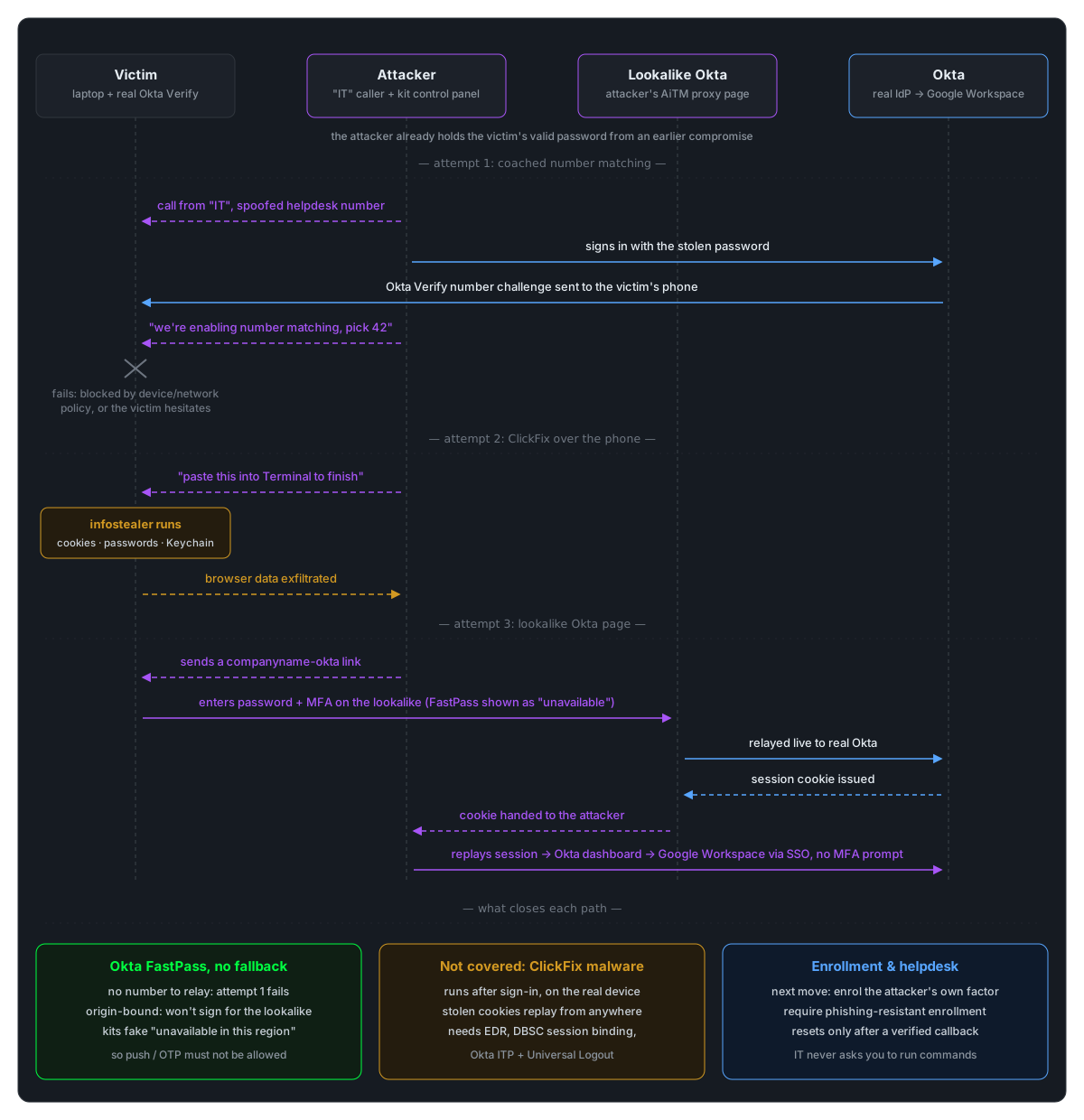
How does the attack work
1. The attacker already has the password
Nothing in this chain involves guessing a password. It came from an earlier credential phish, an infostealer log, or reuse from a breached site. What the attacker doesn’t have is the second factor, and everything that follows is about getting past it.
2. The call comes from “IT”
The attacker phones the victim posing as the internal IT or workplace technology team. Current campaigns do their homework first: real names of IT staff, the real helpdesk number spoofed as caller ID, and a pretext that matches something the company might plausibly be doing.
In this case the pretext was that IT was rolling out number matching on the victim’s account and needed them to confirm it was working.
It’s a clever choice. Number matching is a real security improvement, many employees have heard it’s coming, and the pretext turns the victim’s willingness to cooperate with a security change into the mechanism of the attack.
3. Attempt one: coach the number challenge
The attacker starts a sign-in with the stolen password. Okta sends a number challenge to the victim’s real Okta Verify. The attacker can see the number on their own screen, so they read it out: “you should see a prompt now, pick 42.”
This is the part number matching was never designed to stop. It defeats blind push bombing, where the attacker can’t see which number the victim needs. It doesn’t defeat an attacker who is watching the same login attempt and simply tells the victim the answer.
4. When that fails, move the attack onto the victim’s device
In this case the coached approval didn’t get the attacker in. There are a few reasons that can happen: the victim hesitates or picks the wrong number, or, more usefully for defenders, an Okta policy blocks the sign-in anyway because it’s coming from an unknown device or a network zone the policy doesn’t trust.
Either way, the attacker’s problem is now that their device isn’t good enough. The obvious fix, from their point of view, is to act from the victim’s device instead.
5. Attempt two: ClickFix over the phone
The caller asks the victim to open Terminal and paste in a command “to finish applying the update” or “to reset Okta Verify on your laptop.”
This is ClickFix, just delivered by voice rather than through a fake CAPTCHA page. The command is usually a one-liner that pulls down a script or disk image and runs it. On macOS the payload is typically an infostealer that:
- shows a fake system dialog asking for the user’s Mac password, and keeps asking until it gets one;
- copies browser cookies, saved passwords and autofill data from every browser it can find;
- takes Keychain contents; and
- sends all of it back to the attacker.
Recent macOS releases now warn when you paste a potentially dangerous command into Terminal. Attackers have already started routing around that with other places to paste, such as Spotlight, so don’t count on the warning alone.
The important part for identity teams is that this step happens after authentication, on the real device. Session cookies copied out of the browser can be replayed from anywhere. Neither number matching nor FastPass has any say over it.
6. Attempt three: the lookalike Okta page
The victim was also sent to a page that looked exactly like the company’s Okta sign-in, on a domain along the lines of companyname-okta.com or sso-companyname.com, where they entered their password and their MFA.
This is the adversary-in-the-middle pattern: the page relays everything to the real Okta in real time and captures the session cookie Okta sends back. What’s new is how closely the kits now work with the caller. Okta Threat Intelligence reported in January 2026 on phishing kits built specifically for vishing. The caller controls which screen the victim sees while talking them through it, so the page can show exactly the MFA prompt the caller has just described.
Researchers who captured these kits also found they list FastPass, security keys and smart cards as options but have them fail with a fake “currently unavailable in this region” error. The goal is to push the victim onto a factor that can be relayed: push, OTP or SMS.
7. Replay the session, pivot into Google Workspace
With a valid Okta session, from the lookalike page or from the stolen cookies, the attacker has the Okta dashboard and every app behind it. In an Okta and Google Workspace environment, that means SSO straight into Gmail, Drive and Calendar with no further MFA prompt. From there the usual moves are searching mail and Drive for sensitive data, adding mail forwarding rules, granting OAuth apps access, or using the account to phish colleagues internally.
Would number matching have been enough?
No. Number matching helps in exactly one situation: an attacker who is triggering pushes blind and hoping for a tap. In this chain:
| Stage | Number matching | FastPass, enforced with no fallback |
|---|---|---|
| Caller reads out the number | Doesn’t help. The caller supplies the number | Stops it. There is no number to read out |
| Lookalike Okta page (AiTM) | Doesn’t help. The page just shows the live number | Stops it. FastPass is bound to the real Okta domain and won’t sign for a lookalike |
| ClickFix infostealer | Doesn’t help | Doesn’t help. The malware takes the session after sign-in |
| Attacker enrols their own factor, or talks the helpdesk into a reset | Doesn’t help | Only helps if enrolling a new factor also requires a phishing-resistant method or verified identity |
Number matching is still worth having over a plain Approve button. It just isn’t phishing-resistant, and Okta says so directly: a caller on the phone can simply tell the user which number to pick.
Could FastPass have prevented it?
Mostly, with three conditions.
It has to be required, not just offered. The fake “unavailable in this region” error only works if the victim can fall back to something else. If your authentication policies still allow Okta Verify push or OTP for the apps that matter, the attacker will steer the victim onto that. For Okta itself and high-value apps, set the policy to require a phishing-resistant authenticator, and treat any remaining push or OTP fallback as a known gap you’re choosing to accept.
Enrollment has to be as strong as sign-in. Once FastPass blocks sign-in, the attacker’s next move is to get their own authenticator onto the account, by coaching the victim through an enrollment or by calling the service desk for an MFA reset. Require a phishing-resistant method, or verified identity, to enroll a new authenticator, and give the service desk a verification procedure that doesn’t depend on caller ID or on the caller knowing the employee’s details. A callback to a known number, or manager confirmation, are the usual options.
It doesn’t protect the endpoint. FastPass proves the right device signed in to the right domain. If the user then runs an infostealer on that device, the session cookies it steals are valid anywhere until they expire or are revoked. That part of the chain needs different controls:
- Session binding. Google’s Device Bound Session Credentials (DBSC) ties Workspace session cookies to a key held on the device, so a copied cookie doesn’t work from somewhere else. At the time of writing Google’s general availability covers Chrome on Windows, so check which of your platforms are covered. A Mac-heavy organisation hit by a Terminal-based ClickFix may not be.
- Continuous session evaluation. Okta Identity Threat Protection looks for a session suddenly appearing from a different IP address or device. It can raise the user’s risk level and trigger Universal Logout across connected apps.
- Endpoint controls. EDR that watches for shells spawning
curl | bash,osascriptpassword prompts and unsigned apps launching from freshly mounted disk images. On Windows, the equivalent is a PowerShell one-liner pasted into the Run dialog. - Device assurance and network zones in Okta. These are what likely stopped attempt one in this scenario. They’re worth having exactly because they don’t depend on the victim making a good decision.
What to actually detect
Okta System Log
system.push.send_factor_verify_pushfollowed by a failed or denied verification, particularly from an IP address or ASN the user has never signed in from.policy.evaluate_sign_ondenials for a user whose password was clearly correct. The password worked, but the device or network didn’t. That combination is a strong sign the password is in someone else’s hands.user.mfa.factor.activate, or a helpdesk-initiated factor reset, shortly after either of the above.user.session.startfrom hosting providers, VPNs or residential proxies, followed by app access within minutes.user.account.report_suspicious_activity_by_enduser, if you’ve enabled end-user reporting from Okta Verify. It’s a free signal, so make sure it reaches the security team.
Session reuse
The same Okta or Google session showing up from a second IP address or device fingerprint while the original is still active. This is the signal that catches both the AiTM cookie and the infostealer cookie, and it’s the one covered in more depth in the AiTM post.
Google Workspace
Sign-ins via SSO from unfamiliar locations, new mail forwarding or filter rules, OAuth grants to unfamiliar apps, and bulk Drive downloads or sharing changes shortly after an unusual Okta session.
Endpoint
Terminal, or Spotlight-launched shells, running network downloaders piped into interpreters; osascript displaying password dialogs; hdiutil attach on files in temp directories; non-browser processes reading browser cookie and login databases.
Infrastructure
Newly registered domains combining your company name with okta, sso, login or helpdesk, seen through certificate transparency monitoring or DNS logs.
People
“IT called me and asked me to…” reports. Give users one obvious, fast way to report these, and correlate them with the identity telemetry above. Several of these calls in a short window means a campaign, not a one-off.
Responding to a suspected incident
Treat this as two incidents that happen to share a victim: an identity compromise and an endpoint compromise.
For the identity side:
- clear the user’s Okta sessions and revoke their tokens, or trigger Universal Logout if you have it;
- sign the user out of Google Workspace, reset their password, and review and revoke OAuth grants, app passwords and any new mail forwarding or filter rules;
- review every factor on the account, remove any enrolled during the incident window, and re-enroll with a phishing-resistant method; and
- work out what the attacker’s sessions accessed, in Okta and in every app behind it.
For the endpoint side, if the user ran the command:
- isolate the device and assume everything the infostealer could reach is gone: every saved browser password, every session cookie for every site, and Keychain contents, not just Okta;
- check for persistence, such as new LaunchAgents or LaunchDaemons, before returning the device to the user, and reimage if in doubt; and
- rotate the credentials that were stored on the device, including personal ones the user may have saved there.
Finally, check whether the service desk was contacted about the same user, and whether other employees received similar calls.
What to tell users
The awareness message for this chain is short, and it’s worth being blunt:
- IT will never ask you to read out, or enter, a number from Okta Verify on a call. A caller who already knows which number you’ll see isn’t proving they’re legitimate. They’re proving they started the sign-in.
- IT will never ask you to paste a command into Terminal, the Run box or Spotlight. No exceptions, however urgent or plausible the call sounds.
- Only sign in to Okta from the bookmark or the company portal, never from a link someone sends you during a call. If FastPass says it’s unavailable, stop and report it. That error is the phishing kit’s tell.
- If in doubt, hang up and call back on the number from the intranet, not the one on your screen.
The takeaway
Number matching fixed a specific problem, blind push bombing, and it’s easy to let that success stand in for “MFA fatigue is solved.” Put a person on the phone and the control doesn’t just weaken, it turns into a script the attacker reads from.
FastPass removes the thing a caller can relay, and origin binding means a lookalike Okta page can’t use it. But that only holds when it’s required with no fallback and enrollment is as well protected as sign-in. Even then, it can’t help once the user runs the attacker’s code. From that point the defences are session binding, continuous session evaluation and the endpoint.
The pattern across this whole series stays the same: move each control from “hopefully the user makes the right call in the moment” to “this doesn’t work regardless of what anyone says on the phone”, then watch closely for the places where you haven’t managed that yet.
Further reading
- Okta Threat Intelligence — Phishing kits adapt to the script of callers (Jan 2026)
- Mirage Security — Inside the ShinyHunters vishing playbook
- Netskope — macOS ClickFix campaign: AppleScript stealers and new Terminal protections
- Google Workspace Updates — DBSC generally available in Chrome for Windows
- Okta — Identity Threat Protection overview
- Okta — FastPass documentation
- CISA — Implementing Number Matching in MFA Applications